How to Load & Save XML Configs
Some GCam versions support import/export of .xml files, allowing users to quickly load the best settings for their phone.
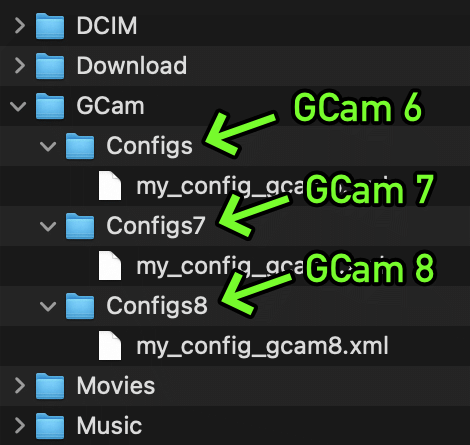
Config files are stored inside a folder, which needs to be created manually using a file manager or automatically by saving your config:
- GCam 8.x:
/GCam/Configs8/ - GCam 7.x:
/GCam/Configs7/ - GCam 6.x:
/GCam/Configs/
⚠️ To load a config, move the .xml file into this folder. Check instructions below.
⚠️ Some versions use a different directory. This is usually mentioned on the configs/changelog page.
The top folder, /GCam/, must be created on the same level as the DCIM, Downloads, etc, folders. Example:
How To:
⏫ How to load / import .xml files »
It's very easy:
- Create the folder for the GCam version you're using.
- Move the .xml file into this folder.
- ⚠️ Android 11 and above: You may have to allow GCam to "allow management of all files" inside the app permissions → files and media.
- Open GCam.
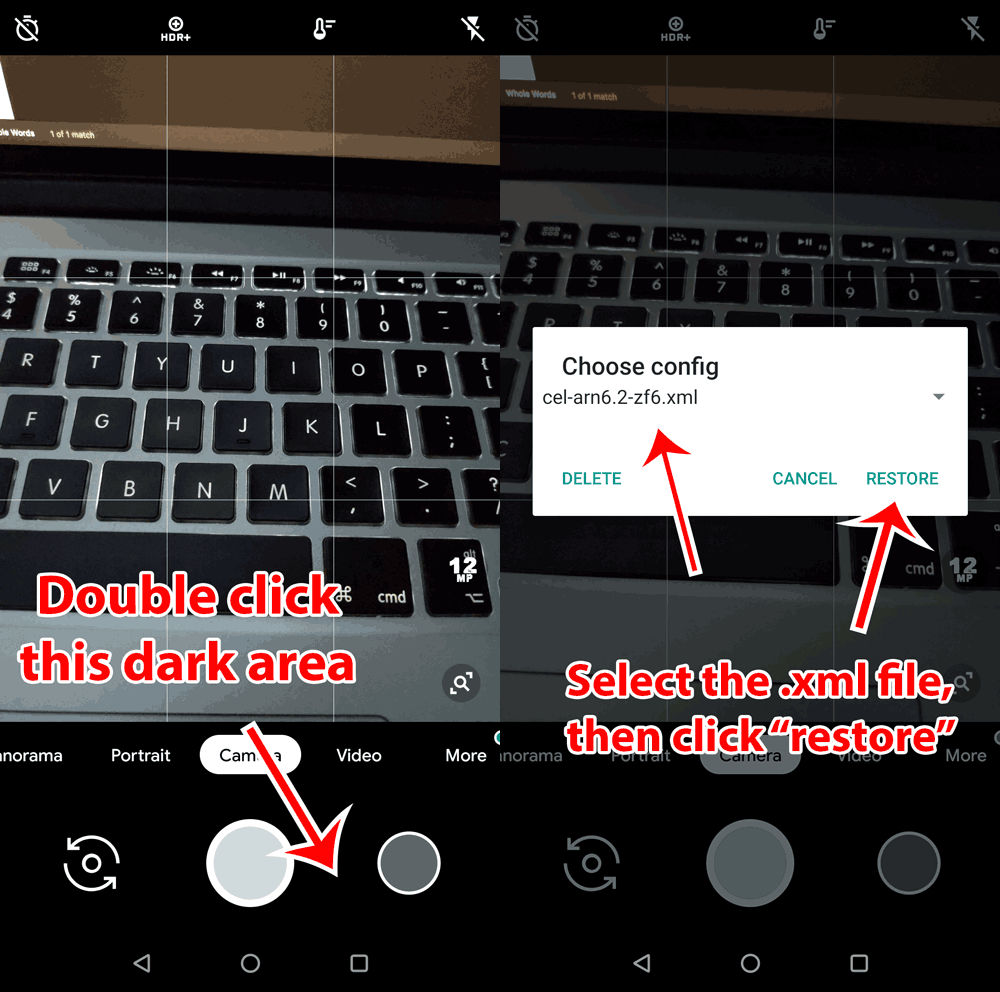
- Double click the dark area around the shutter button.
- Select the config (.xml file) and "restore" (sometimes you have to do it twice).